
OneExpert Modes & Acceptance Workflow
Test Philosophy — Prove the Plant, Not Just the Amp
Field verification proves the physical layer supports the deployed split and service tier—not a screenshot for closeout alone. A housing can show acceptable forward level at one frequency while failing tilt across OFDM blocks or hiding return ingress that destroys upstream throughput.
The Viavi OneExpert consolidates meter, spectrum, sweep, and DOCSIS-oriented measurements. Mastery is knowing which test answers which question: OneCheck for composite acceptance, ingress scan for return noise, sweep for frequency response, DOCSIS Check for modem-visible confirmation.
Always confirm the limit profile matches node split class before testing. High-split limits differ from legacy 42 MHz profiles—using the wrong template creates false pass or false fail.
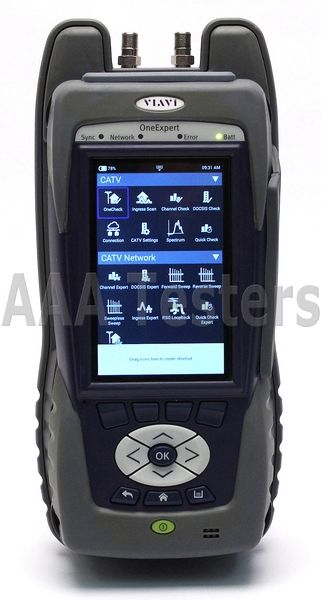
OneExpert test modes — purpose and when to use
- OneCheck
- Automated composite pass/fail vs limits — primary closeout on amp replace
- Ingress Scan
- Listen for return-path noise across upstream allocation — mandatory on high-split
- Channel Check
- Per-carrier downstream level and MER at QAM/OFDM centers
- DOCSIS Check
- Modem-channel view from field perspective — validates customer-visible layer
- Spectrum Analyzer
- Visual identification of carriers, noise floor, and unexpected peaks
- Forward Sweep
- Downstream frequency response — level flatness and tilt vs design
- Reverse Sweep
- Upstream frequency response — critical after split change
OneCheck at amplifier replace closeout
- 1Confirm meter calibration date and correct limit file for node split class
- 2Connect to forward TP with directional coupler; verify TP label coupling (−20 dB typical)
- 3Run OneCheck forward; capture pass/fail screen per job documentation
- 4Connect to reverse TP; run OneCheck reverse and ingress scan if bundled
- 5If any fail, isolate subtest and run targeted follow-up (sweep, ingress hunt)
- 6Store results per ticket; attach to monitoring/NOC notification if required
Never pad down return level to 'fix' ingress scan failure. Lowering return level hides symptoms while modems fight a high noise floor. Fix shield and termination first.
When to sweep vs level-only
- Sweep required
- Amp module replace, diplexer change, major splice work, split migration acceptance
- Level-only acceptable
- Verified stable plant minor pad tweak, monitoring alarm within same module family
- Ingress scan add
- Any return complaint, high-split closeout, after tap/pedestal work affecting drops
- DOCSIS Check add
- Customer modem errors despite meter pass at amp, cluster tickets post maintenance
- Job package wins
- If work order mandates sweep + OneCheck, level spot-check alone is insufficient